HP
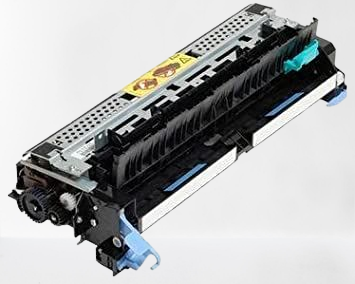
Fuser Assembly for HP LaserJet Enterprise 700 M712 / MFP M725 Compatible Imported
Fuser Assembly for HP LaserJet Enterprise 700 M712 / MFP M725 Compatible Imported
Couldn't load pickup availability
Compatible Fuser Assembly for HP LaserJet Enterprise 700 M712 / MFP M725 — Imported
Get your HP LaserJet Enterprise back to life with the PRM Compatible Fuser Assembly. This imported fuser unit is a direct replacement for the original HP fuser — restoring clean, jam-free printing when the original fuser wears out. One fuser fits the entire M712/M725 series.
Looking for an HP M712 fuser unit or HP M725 fuser assembly? This is the correct fuser assembly for both printer series.
When Do You Need a New Fuser Assembly?
The fuser assembly is the part of your printer that uses heat and pressure to bond toner powder permanently onto the paper. It contains a heating element and a pressure roller that work together. Over time, these components wear out — especially in high-volume A3 enterprise printers like the M712/M725 that handle tens of thousands of large-format pages per month. Replace your fuser when you see:
- Paper jamming inside the printer, especially at the fuser exit area
- Wrinkled, crumpled, or curled pages coming out
- Toner smudging or rubbing off the page — prints smear when you touch them
- Ghosting — faint repeated images or text appearing down the page
- Burning smell coming from the printer during printing
- "Fuser error" or "50.x error" on the display panel
- Slow printing — printer pauses between pages to let the fuser cool down
- Wavy or distorted prints, especially on the edges
- Paper curling excessively after printing, particularly on A3 sheets
If you've already replaced the toner (HP 14A / CF214A) and drum, and prints still smudge, jam, or come out wrinkled — the fuser assembly is almost certainly the cause. Toner issues affect print darkness; fuser issues affect how the toner sticks to the paper.
1. One Fuser Fits the Entire M712/M725 Range: This fuser assembly is compatible across the HP LaserJet Enterprise 700 M712dn, M712xh, MFP M725dn, M725f, and M725z. Same fuser unit — works in all models.
2. A3 Capable: Both the M712 and M725 are A3-format printers. The fuser handles A4, Legal, A3, and other large paper sizes. A worn fuser often shows problems on A3 first — larger paper is more prone to curling and edge distortion when the fuser rollers are worn.
3. Restores All MFP Functions (M725): The M725 is a full enterprise multifunction printer — print, scan, copy, and fax. While the fuser only handles the print/copy output, a jamming or smudging fuser disrupts every function that puts toner on paper. A new fuser restores clean output across all functions.
4. Fixes Paper Jams at the Source: Most recurring paper jams in these printers are caused by a worn fuser film or a hardened pressure roller. A new fuser assembly eliminates the jam point completely — critical for enterprise environments where printer downtime costs money.
5. Stops Toner Smudging: If your prints look fine but the toner rubs off when you touch the page, the fuser isn't reaching the correct temperature to bond toner to paper. A new fuser restores proper heat and pressure, giving you smudge-proof prints.
6. Eliminates Ghosting: Ghost images happen when the fuser retains toner residue from previous prints. A fresh fuser eliminates this problem immediately.
7. Restores Duplex Printing: All models support automatic two-sided printing. A failing fuser often causes jams specifically during duplex printing — paper curls after the first side and jams when it re-enters for the second side. A new fuser fixes this.
8. Built for Enterprise-Grade A3 Volume: The M712/M725 series are rated at 40-41 pages per minute — enterprise A3 workhorses with monthly duty cycles up to 200,000 pages. The fuser is the most stressed component in any high-volume printer. If your printer has done 200,000+ pages on the original fuser, replacement is expected maintenance — not a sign of printer failure.
9. Compatible Imported Quality: China-manufactured compatible fuser delivering reliable performance at a fraction of the original HP fuser cost. Original HP fusers for A3 enterprise printers can be extremely expensive — a compatible fuser keeps your M712 or M725 running without the enterprise price tag.
10. Easy Installation: Open the rear door, release the fuser locking levers, slide out the old fuser, slide in the new one, lock it in place, and close. 15-20 minutes for any printer technician. No special tools needed.
11. Tested Before Shipping: Every PRM fuser assembly is heat-tested before dispatch to ensure the heating element and pressure roller are working. Backed by our testing warranty.
Compatible Printers:
HP: LaserJet Enterprise 700 M712dn, M712xh, LaserJet Enterprise MFP M725dn, M725f, M725z
Also known as: HP M712 Fuser Assembly, HP M725 Fuser Unit, HP M712dn Fuser Assembly, HP M725dn Fuser Unit, HP M712 Fixing Assembly, HP M725 Fuser Kit, HP Enterprise 700 Fuser Unit, CF235-67922
Share